Author: Gletus Allwin

  • Innovative Uses of Interactive Displays in Corporate
Training

    Innovative Uses of Interactive Displays in Corporate
Training

    Discover how interactive displays are transforming corporate training by making learning more engaging, collaborative, and effective. Explore innovative ways organizations are using modern technology to enhance employee development and performance.
    On this page
    • Transforming Employee Training
    • Interactive Learning Experiences
    • Integration with Digital Tools
    • Enhancing Training Outcomes

    Deliver engaging presentations with interactive visuals

    Collaborate seamlessly with teams and participants

    Share ideas and content in real time

    1. Transforming Employee Training

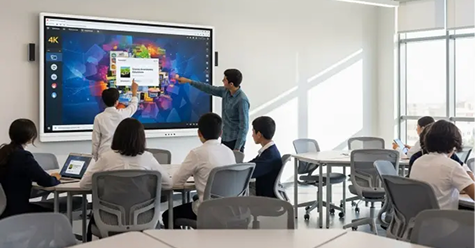
    Traditional training methods often rely on passive learning. Interactive displays introduce dynamic content and hands-on activities, enabling employees to actively participate and engage with the material for better understanding.

    2. Display Size and Resolution

    Choosing the right screen size depends on the room size and viewing distance. Larger displays are ideal for bigger spaces, while smaller panels work well in compact rooms. High-resolution screens ensure clear visuals, making content easy to read and understand.

    3. Integration with Digital Tools

    These displays integrate seamlessly with business applications, cloud platforms, and communication tools. Trainers can access, share, and update content easily, ensuring training sessions remain relevant and efficient.

    4. Enhancing Training Outcomes

    By improving engagement and interaction, interactive displays help employees retain information more effectively. This leads to better performance, improved skill development, and more productive teams.

    PowerBoard Team

    Ensure the panel supports multiple connectivity options such as HDMI, USB, and wireless casting. Compatibility with various devices and software platforms allows seamless integration into your existing setup, improving overall usability.

  • The Role of Interactive Technology in Modern
Workspaces

    The Role of Interactive Technology in Modern
Workspaces

    Discover how interactive technology is transforming modern workspaces by improving collaboration, communication, and overall efficiency. Explore the key benefits for teams, managers, and organizations adapting to digital work environments.

    On this page
    • Evolution of Modern Workspaces
    • Enhancing Team Collaboration
    • Improving Communication Efficiency
    • Integration with Digital Workflows

    Engaging presentations with interactive visuals

    Seamless collaboration across teams

    Real-time communication and decision making

    1. Evolution of Modern Workspaces

    Traditional office setups are shifting towards more flexible and technology-driven environments. Interactive technology supports this evolution by providing tools that enhance connectivity, adaptability, and user experience in daily operations.

    2. Enhancing Team Collaboration

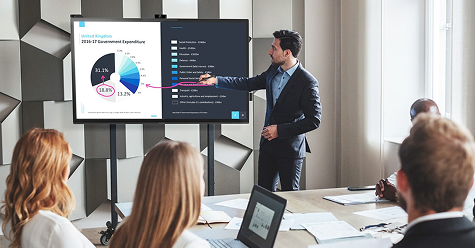
    Interactive displays allow teams to work together more effectively by enabling shared access to content, real-time annotations, and group discussions. This fosters teamwork and ensures that every participant can contribute actively.

    3. Improving Communication Efficiency

    Clear and effective communication is essential in any organization. Interactive technology simplifies information sharing through visual presentations, live updates, and instant collaboration, reducing misunderstandings and delays.

    4. Integration with Digital Workflows

    Modern workplaces rely on various digital tools and platforms. Interactive displays integrate seamlessly with these systems, allowing users to access files, applications, and cloud-based resources in one place, improving workflow efficiency.

    PowerBoard Team

    We share insights on technology, workplace solutions, and the future of interactive collaboration.

  • Case Studies: Successful Implementations of Powerboard Solutions

    Case Studies: Successful Implementations of Powerboard Solutions

    Explore how interactive displays are enhancing modern business meetings through better collaboration, clearer communication, and increased productivity for teams and organizations.

    On this page
    • Smart Classrooms Transformation
    • Corporate Meeting Room Upgrade
    • Training & Development Centers
    • Retail & Presentation Spaces

    Interactive presentations with dynamic visual tools

    Seamless team collaboration in real time

    Efficient decision-making with shared displays

    1 Smart Classrooms Transformation

    Educational institutions have adopted Powerboard interactive flat panels to create engaging and student-focused learning environments. Teachers can present dynamic content, conduct interactive sessions, and improve knowledge retention through visual and hands-on learning experiences.

    2 Corporate Meeting Room Upgrade

    Businesses are enhancing their meeting rooms with Powerboard smart displays and projector systems. These tools enable seamless presentations, real-time collaboration, and efficient communication, helping teams make faster and better decisions.

    3 Enhancing Student Engagement

    Organizations use Powerboard solutions for employee training programs, workshops, and seminars. Interactive features and multimedia support make training sessions more engaging and effective, ensuring better learning outcomes.

    4 Retail & Presentation Spaces

    Retail stores and showrooms leverage Powerboard digital displays to showcase products, run promotions, and create immersive customer experiences. High-quality visuals help attract attention and improve customer engagement.

    PowerBoard Team

    We share insights on smart technology, interactive solutions, and the future of digital learning and collaboration.

  • Interactive Displays Vs. Traditional Whiteboards: A Comparative Analysis

    Interactive Displays Vs. Traditional Whiteboards: A Comparative Analysis

    Discover how interactive displays compare with traditional whiteboards in modern learning and work environments. Explore the key differences in functionality, engagement, and overall effectiveness for classrooms and businesses.

    On this page
    • Overview of Teaching Tools
    • Engagement and Interaction
    • Collaboration and Flexibility
    • Access to Digital Resources

    Engaging presentations with interactive visuals

    Collaborative learning and teamwork

    Real-time sharing and decision making

    1 Overview of Teaching Tools

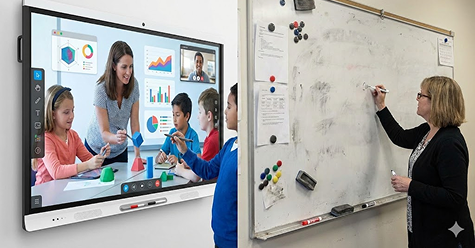
    Traditional whiteboards offer a simple and reliable way to present information using markers and manual writing. In contrast, interactive displays combine high-resolution screens with touch capabilities, enabling multimedia presentations, annotations, and digital interaction in a single device.

    2 Engagement and Interaction

    Interactive displays significantly enhance engagement by allowing users to interact directly with the content. Features like touch response, animations, and multimedia elements make learning and presentations more dynamic. Traditional whiteboards, while effective for basic explanations, offer limited interaction.

    3. Collaboration and Flexibility

    Interactive displays support real-time collaboration by allowing multiple users to work on the screen simultaneously. Content can be saved, shared, and accessed later. Traditional whiteboards lack this flexibility, as information must be manually rewritten or erased after use.

    4. Access to Digital Resources

    With built-in connectivity, interactive displays provide instant access to online resources, applications, and cloud-based tools. This allows users to integrate videos, presentations, and live data into sessions. Traditional whiteboards do not support digital integration, limiting the scope of content delivery.

    PowerBoard Team

    We share insights on technology, education, and the future of interactive learning.

  • How Interactive Displays Enhance BusinessMeeting

    How Interactive Displays Enhance BusinessMeeting

    Discover how interactive displays are transforming modern business meetings by improving collaboration, communication, and productivity. Explore the key benefits for teams, managers, and organizations.

    On this page
    • 1. Better Engagement in Meetings
    • 2. Improved Team Collaboration
    • Smarter Presentations
    • Seamless Connectivity & Integration

    Engaging presentations with interactive visuals

    Collaborative learning made easy

    Real-time sharing and decision making

    1.Better Engagement in Meetings

    Interactive displays capture attention with high-resolution visuals, touch capabilities, and multimedia integration. Instead of passive listening, participants can actively engage by interacting with content—highlighting key points, annotating documents, or navigating presentations. This leads to more focused discussions and improved information retention during meetings.

    2.Improved Team Collaboration

    Interactive displays create a shared workspace where teams can collaborate in real time. Multiple users can contribute simultaneously, whether they are in the same room or joining remotely. Teams can brainstorm ideas, edit documents together, and visualize concepts instantly, fostering a more collaborative and productive meeting environment.

    3.Smarter Presentations

    With interactive displays, presentations become more dynamic and impactful. Presenters can switch between slides, videos, live data, and web content seamlessly. The ability to annotate directly on the screen helps emphasize key points, making presentations clearer and more engaging for clients and team members alike.

    4.Seamless Connectivity & Integration

    Modern interactive displays support wireless connectivity, screen sharing, and integration with business tools like cloud platforms and video conferencing apps. This ensures smooth communication between remote and in-office teams. Files, reports, and dashboards can be accessed instantly, saving time and reducing technical interruptions.

    PowerBoard Team

    We share insights on technology, business innovation, and the future of interactive solutions.

  • The Future of Classroom Technology: Interactive Flat Panels

    The Future of Classroom Technology: Interactive Flat Panels

    On this page
    • The Rise of Interactive Learning
    • Smarter Classrooms with Technology
    • Enhancing Student Engagement
    • Seamless Digital Integration

    Engaging lessons with interactive displays

    Collaborative learning made easy

    Real-time interaction and student participation

    1 The Rise of Interactive Learning

    Modern education is moving beyond traditional teaching methods. Interactive flat panels enable dynamic lessons where students actively participate through touch, visuals, and multimedia content. This shift encourages curiosity, creativity, and deeper understanding.

    2 Smarter Classrooms with Technology

    Interactive flat panels integrate seamlessly with digital tools, cloud platforms, and educational apps. Teachers can access and present a wide range of content instantly, making lessons more flexible, efficient, and impactful.

    3 Enhancing Student Engagement

    With vibrant displays and intuitive touch features, interactive flat panels capture students’ attention and keep them involved throughout the lesson. Active participation leads to improved focus, better retention, and a more enjoyable learning experience.

    4 Seamless Digital Integration

    These panels support connectivity with devices, internet resources, and collaborative tools. Teachers and students can share content, annotate in real time, and access digital materials effortlessly, creating a connected classroom environment.

    PowerBoard Team

    We share insights on technology, education, and the future of interactive learning.

  • Top Benefits of Using Interactive Flat Panels in Education

    Top Benefits of Using Interactive Flat Panels in Education

    On this page
    • 1. Enhanced Student Engagement
    • 2. Improved Collaboration
    • 3. Supports Different Learning Styles
    • 4. Easy Access to Digital Resources

    Engaging lessons with interactive displays

    Collaborative learning made easy

    Real-time interaction and student participation

    1. Enhanced Student Engagement

    Interactive flat panels capture students’ attention with vibrant displays, touch interaction, and
    multimedia content. This leads to increased participation and better information retention. When
    students can physically interact with the content on screen — dragging elements, drawing diagrams, or annotating text — learning transforms from passive observation into active discovery, significantly boosting knowledge recall and classroom enthusiasm.

    2. Improved Collaboration

    Large interactive displays create natural hubs for group activities. Teams can work on shared
    whiteboards, annotate documents together, and contribute simultaneously — fostering a collaborative spirit that reflects modern workplace dynamics. Teachers can facilitate group discussions with real- time shared screens, making every student an active contributor rather than a passive observer.

    3. Supports Different Learning Styles

    Interactive flat panels accommodate visual, auditory, and kinesthetic learners all at once. Teachers can seamlessly switch between video demonstrations, audio explanations, and hands-on touch activities — ensuring that every student’s preferred learning mode is addressed within a single lesson. This multisensory approach dramatically improves comprehension across diverse classrooms.

    4. Easy Access to Digital Resources

    With built-in internet connectivity and app ecosystems, interactive flat panels give teachers and
    students immediate access to a vast digital library of educational content — videos, simulations, real- time data, and cloud-based tools. Content that once required lab setups or expensive equipment is now available at a tap, democratising access to quality educational resources.

    PowerBoard Team

    We share insights on technology, education, and the future of interactive learning.

  • Tips for Choosing the Right Interactive Flat Panel for Your Needs

    Tips for Choosing the Right Interactive Flat Panel for Your Needs

    Discover how to choose the right interactive flat panel based on your specific needs and environment. Explore the key factors that help educators, businesses, and organizations make informed decisions for better performance and usability.

    On this page
    • Understand Your Requirements
    • Display Size and Resolution
    • Touch Performance and Features
    • Connectivity and Compatibility

    Deliver engaging presentations with interactive visuals

    Collaborate seamlessly with teams and participants

    Share ideas and content in real time

    1. Understand Your Requirements

    Start by identifying where and how the interactive flat panel will be used. Classrooms, meeting rooms, and training centers have different needs. Consider the number of users, type of content, and level of interaction required to ensure the panel fits your purpose.

    2. Display Size and Resolution

    Choosing the right screen size depends on the room size and viewing distance. Larger displays are ideal for bigger spaces, while smaller panels work well in compact rooms. High-resolution screens ensure clear visuals, making content easy to read and understand.

    3. Touch Performance and Features

    Interactive flat panels should offer smooth and responsive touch capabilities. Look for features like multi-touch support, writing accuracy, and gesture controls. These features enhance user experience and make interaction more natural and efficient.

    4. Connectivity and Compatibility

    Ensure the panel supports multiple connectivity options such as HDMI, USB, and wireless casting. Compatibility with various devices and software platforms allows seamless integration into your existing setup, improving overall usability.

    PowerBoard Team

    Ensure the panel supports multiple connectivity options such as HDMI, USB, and wireless casting. Compatibility with various devices and software platforms allows seamless integration into your existing setup, improving overall usability.